What Is Nidam?
Nidam addresses three fundamental problems that almost every web application needs to solve:
- User registration — creating and storing user accounts.
- Authentication — verifying who a user is and establishing a login session.
- Authorization — controlling what an authenticated user is allowed to access.
It does this independently of your application stack.
You can use your own frontend, backend, and database, while Nidam takes care of the authentication and authorization infrastructure around them.
What makes Nidam different is that it implements this using the OAuth 2.0 standard together with the Backend for Frontend (BFF) pattern.
Why OAuth 2.0 and BFF?
You may already be familiar with JWTs or JWT Bearer authentication. However, using JWTs does not necessarily mean that your application is using OAuth 2.0.
You may also already be using OAuth 2.0 with the Authorization Code flow. That still leaves an important architectural decision: where should the resulting access token live?
A browser-based application can be designed to receive and use an access token directly. OAuth 2.0 itself does not require that the token remain on the server.
For applications where you want to keep OAuth tokens out of the browser, the Backend for Frontend (BFF) pattern is an alternative. In this architecture, the BFF acts as the OAuth client, keeps the tokens on the server, and exposes your application to the browser through a session-based interface.
Nidam implements this approach for you.
So whether OAuth 2.0 is completely new to you or you already have experience with it, Nidam removes much of the infrastructure and implementation work.
You provide:
- your backend
- your frontend
- your database
Then you configure Nidam to work with them.
That's it.
You can focus on building your web application while Nidam handles the OAuth 2.0 and BFF plumbing around it.
What Nidam Offers
This section gives an overview of the features Nidam provides and the contracts expected from your application.
User Registration
A Nidam user account is identified by an email address and a password.
User accounts can be stored in the embedded H2 database or in an external database of your choice.
For SQL databases, Nidam supports:
MySQL, PostgreSQL, MariaDB, Microsoft SQL Server, Oracle Database, and IBM DB2.
Nidam also supports MongoDB.
Configuring an external database only requires you to provide the appropriate connection settings in your YAML configuration. The database must, of course, be available when Nidam starts.
Password Storage
Nidam never stores user passwords in plain text.
Before a password is stored, Nidam hashes it using a password encoder. scrypt is used by default, and the following algorithms are also supported:
- bcrypt
- argon2
- pbkdf2
The default is suitable for most applications. You can change the password encoder if your application's requirements call for a different choice.
User Authorities
Each user account is assigned a list of authorities.
These authorities are what your protected backend can use to decide whether a user is allowed to access a particular resource.
The default authorities are:
manage-users
manage-projects
Every newly created user receives these authorities by default.
These are only defaults for the Nidam setup. You should replace them with authorities appropriate for your own application.
User registration is performed by the user through the registration flow. Nidam does not currently provide an administrator portal for manually creating users.
Google reCAPTCHA
Nidam also supports Google reCAPTCHA for user registration.
Two registration endpoints are provided: one protected by reCAPTCHA and one without it.
Your frontend uses the reCAPTCHA site key, while you provide the secret key to Nidam. Once configured, Nidam performs the server-side verification.
The default Nidam frontend includes an example implementation that you can use as a reference when integrating reCAPTCHA into your own frontend.
Login: User Authentication
This is where OAuth 2.0 enters the picture.
With a traditional application, you might build a /login page inside your SPA and send the user's username and password to your backend.
That is not how the Nidam authentication flow works.
The login page is hosted by Nidam's Authorization Server rather than by your SPA.
Your frontend therefore does not need to implement the OAuth 2.0 login flow itself.
The default login page is intentionally generic so that it can fit into different applications:
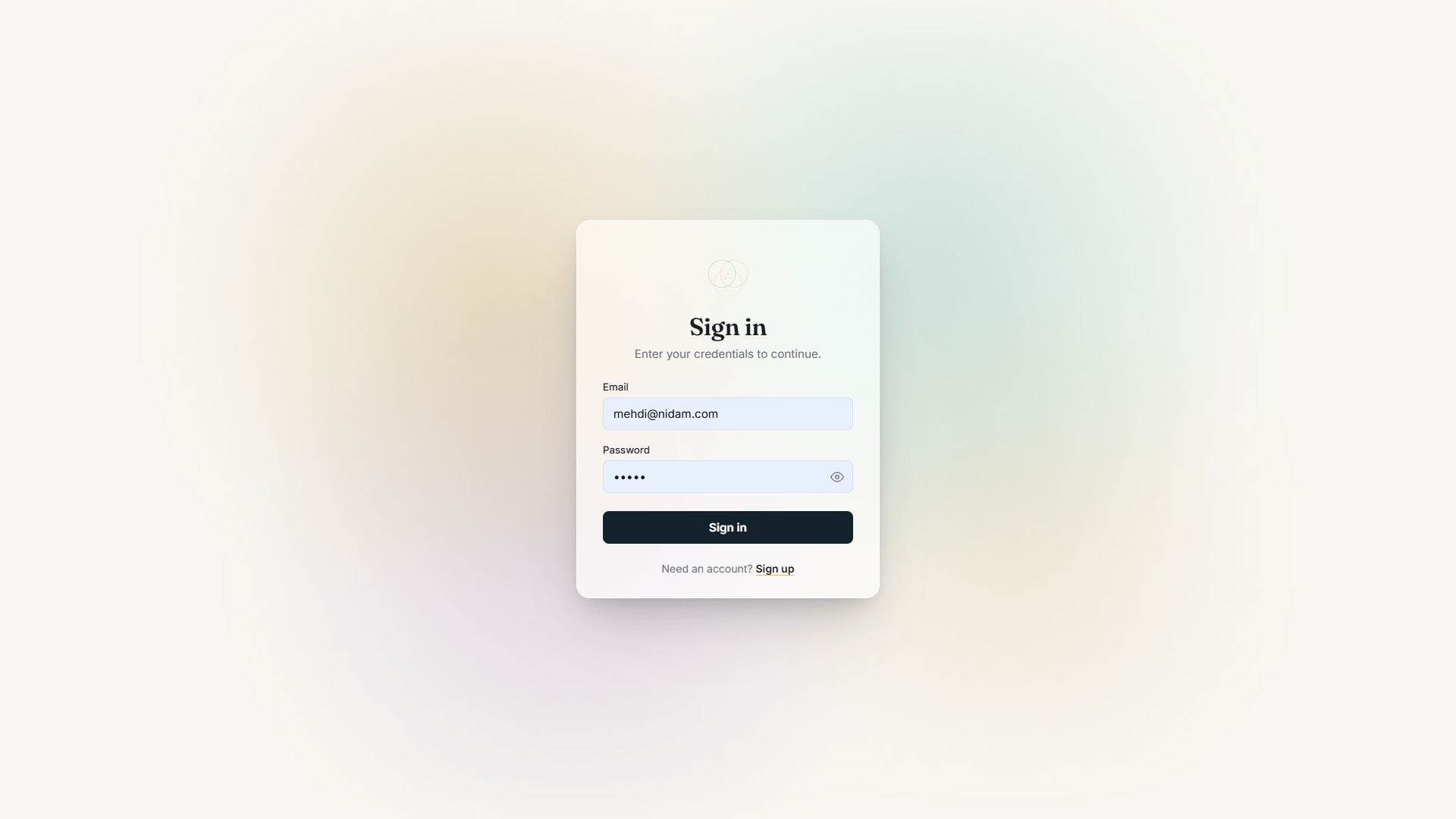
And the page is replaceable.
You can provide your own HTML, CSS, images, and other resources and use them instead of the default login page. A later section walks through that process.
OAuth Client Configuration
Behind the scenes, Nidam's BFF acts as an OAuth 2.0 client.
Like any OAuth client, it has a client ID and credentials that allow it to authenticate with Nidam's Authorization Server.
You will see these values in the configuration when setting up Nidam. The browser never needs to know the BFF's client credentials.
The details of these settings, including how to choose and configure your own client ID and secret, are covered later in the configuration documentation.
Sessions
After a successful authentication, Nidam needs to keep track of the user's authenticated session.
By default, sessions are stored in memory. This is convenient for development and is why the default Nidam setup works without any additional infrastructure.
For production, you should use Redis.
Nidam supports Redis natively. Switching to Redis is done through configuration, for example:
nidam:
  session-mode: "redis"
You then provide the Redis connection details and the required namespaces.
Using Redis is also required when running the relevant Nidam services in High Availability, because multiple instances need access to shared session state.
Nidam supports running multiple instances of the Token Generator and BFF services for this purpose.
A later section explains session storage, Redis, and High Availability in detail.
How Long Does the User Stay Logged In?
OAuth 2.0 tokens have a limited lifetime known as their TTL (Time To Live).
Nidam's default lifetimes are:
ID Token:      1 hour
Access Token:  1 hour
Refresh Token: 7 days
The minimum supported lifetime for the ID token and access token is 2 minutes.
This means that after the user authenticates, the access token can be used for one hour. When it expires, the user does not necessarily have to log in again.
As long as the refresh token is still valid, Nidam can obtain a new access token transparently.
With the default seven-day refresh token lifetime, the user can continue using the application without entering their credentials again, provided the refresh process remains valid.
These lifetimes are configurable, and the exact behavior depends on your session configuration. The configuration options are explained later.
This behavior applies to both the Redis and Tomcat session modes.
Rate Limiting
To protect the authentication flow from repeated failed login attempts, Nidam includes a local rate limiter.
By default, a user is temporarily locked after five failed attempts for five minutes.
The rate limiter can be configured or disabled according to your application's requirements.
Because it is local to a Token Generator instance, the behavior should also be considered when deploying multiple Token Generator instances.
How Does Your Backend Know It Can Trust a Token?
When Nidam issues an access token, the token is cryptographically signed.
Your backend can use Nidam's public key to verify that the token was issued by Nidam and that its contents have not been modified.
Nidam stores its signing key as a JWK (JSON Web Key) in the key directory at the root of the application.
When Nidam starts for the first time, it automatically generates a key if one does not already exist.
On subsequent starts, the existing key is reused, allowing previously issued tokens to continue to be verified.
Key rotation is not currently supported.
Keeping OAuth 2.0 Tokens Server-Side
The most important part of Nidam's BFF architecture is what happens after authentication.
What Happens After Authentication?
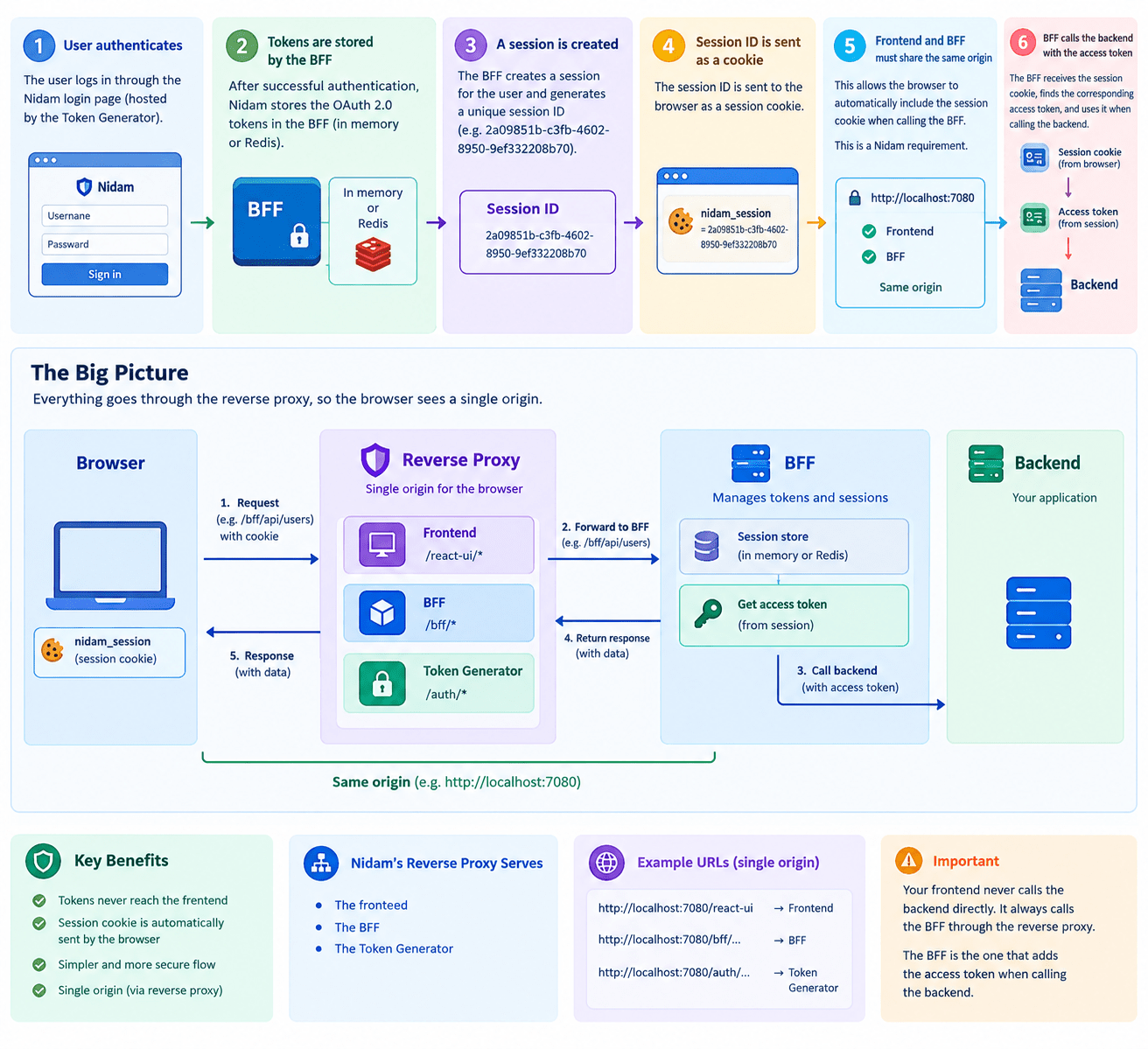
After the user successfully authenticates, Nidam does not give the OAuth 2.0 access token directly to the frontend.
Instead, the tokens are stored by Nidam's BFF, either in memory or in Redis depending on your configuration.
The BFF creates an authenticated session for the user and associates that session with the OAuth tokens.
The browser receives a session identifier through a session cookie, for example:
2a09851b-c3fb-4602-8950-9ef332208b70
From this point on, the browser does not need to know about, store, or manage the OAuth access token.
It only needs to maintain its session cookie.
Why Must the Frontend and BFF Share the Same Origin?
Nidam requires the frontend and BFF to be exposed to the browser through the same origin.
This allows the browser to automatically send the session cookie when the frontend makes requests to the BFF.
For example, suppose the application is exposed through:
http://localhost:7080
The frontend can make a request such as:
GET /bff/api/secret
The browser automatically includes the session cookie.
The BFF receives the cookie, identifies the user's session, retrieves the corresponding OAuth access token, and uses that token when calling the protected backend.
Conceptually:
Browser
   │
   │ session cookie
   ▼
BFF
   │
   │ access token
   ▼
Backend
The frontend therefore never needs direct access to the OAuth access token.
Why Is a Reverse Proxy Needed?
Your frontend, backend, and Nidam's BFF are separate applications and may run on different ports or even different servers.
For example:
Frontend  → localhost:4001
BFF       → localhost:7081
Backend   → localhost:4003
From the browser's point of view, these are different origins.
Nidam's reverse proxy provides a single browser-facing origin and routes requests internally to the appropriate service.
The reverse proxy serve:
- The frontend
- Nidam's BFF
- Nidam's Token Generator
- Nidam's Registration
So, from the browser's point of view, everything is available through one origin:
http://localhost:7080
For example, in the default setup:
http://localhost:7080/spa/...       		→ Frontend
http://localhost:7080/bff/...       		→ BFF
http://localhost:7080/auth/...      		→ Token Generator
http://localhost:7080/registration/...		→ Registration
Your frontend therefore does not call the backend directly.
The request flow is:
Frontend → Reverse Proxy → BFF → Backend
The reverse proxy forwards the request to the BFF.
The BFF retrieves the user's access token from the server-side session, adds it to the request, and forwards the request to your protected backend.
This gives you an important security property:
The frontend works with a session cookie while the OAuth 2.0 tokens remain on the server side, managed by the BFF.
The Good News
Nidam handles all of this for you.
You simply tell Nidam where your frontend is located.
That's it.
Frontend Calling the Backend
Your frontend does not call your backend directly.
By default, frontend requests go through two Nidam components:
- the Reverse Proxy at
http://localhost:7080 - the BFF under
/bff
The BFF then forwards the request to your backend under the /api path.
For example, if your backend exposes:
/whatever-endpoint-served-by-backend
your frontend calls:
http://localhost:7080/bff/api/whatever-endpoint-served-by-backend
These are the default paths. You can customize them to fit your application.
The important part is the architecture:
Frontend → BFF → Backend
How Does Your Frontend Know Whether the User Is Logged In?
A SPA normally needs to determine whether the user already has an authenticated session when it starts.
A common approach is to display a loading state while the frontend makes a request to the server. The response tells the frontend whether the user is authenticated and, if so, provides information about that user.
Nidam provides a conventional endpoint for this:
/bff/api/me
It returns information about the currently authenticated user, such as:
- authorities
The default frontend uses the following convention:
| Unauthenticated State | Authenticated State |
|---|---|
| |
You are free to use this convention, but it is not mandatory.
You can keep /bff/api/me, change the endpoint, or implement your own endpoint entirely.
The important thing is that your frontend has a way to ask:
Is the current user authenticated, and who are they?
Nidam provides the authentication infrastructure. How your frontend presents and uses that information remains under your control.
What You Get
At this point, the responsibilities are clearly separated:
Your Frontend
      │
      ▼
  Nidam BFF
      │
      ▼
Your Backend
Your application owns the user experience and business logic.
Nidam takes care of the authentication flow, OAuth 2.0 tokens, sessions, and the communication between the browser and your protected backend.
The result is a clean separation of concerns: you build the application; Nidam handles the authentication infrastructure.